
NetSuite’s REST web services expose records as JSON and support SuiteQL, a SQL-like query language. From Boomi you can reach them in two ways:
- Boomi’s NetSuite REST connector (listed by Boomi as a tech preview at the time of writing), which uses token-based authentication signed with HMAC-SHA256; or
- the HTTP Client connector with OAuth 1.0, which works with any REST endpoint and is shown here.
Part 1: prepare NetSuite
The token setup is the same as for SOAP, explained step by step in Connect NetSuite with Boomi (SOAP). The differences:
- In Setup → Company → Enable Features → SuiteCloud, enable REST Web Services (and Token-Based Authentication).
- Give the integration role the REST Web Services permission, plus Log in using Access Tokens and the record permissions it needs.
You end up with an account ID, a consumer key and secret, and a token ID and secret.
Part 2: the account-specific URL
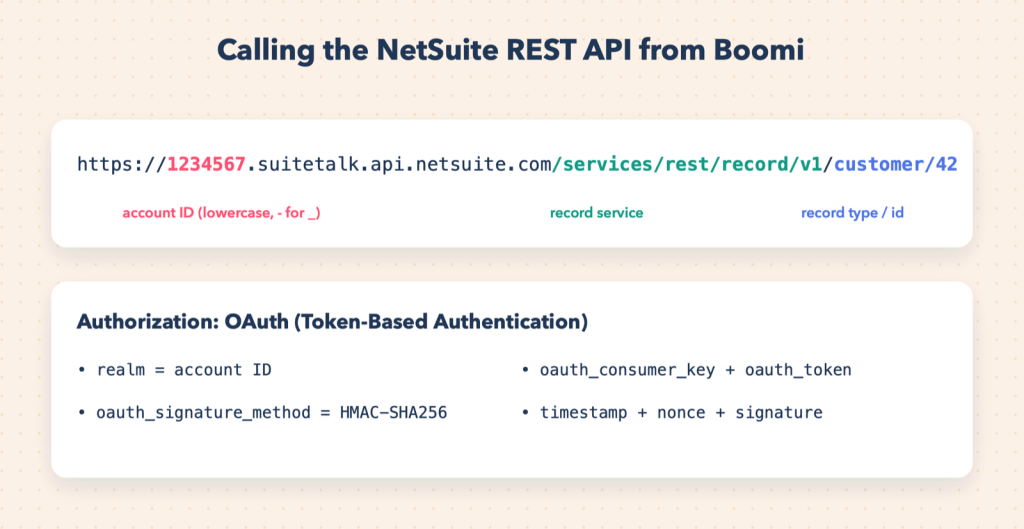
Every NetSuite account has its own REST host:
https://<accountid>.suitetalk.api.netsuite.com/services/rest/record/v1In the host name the account ID is lowercase with - instead of _, so the sandbox 1234567_SB1 becomes 1234567-sb1.
Part 3: the HTTP Client connection with OAuth 1.0
| Field | Value |
|---|---|
| URL | https://1234567.suitetalk.api.netsuite.com/services/rest |
| Authentication | OAuth 1.0 |
| Consumer key / secret | from the integration record |
| Access token / token secret | from the access token |
| Realm | the account ID in its original form, for example 1234567_SB1 |
| Signature method | HMAC-SHA256 |
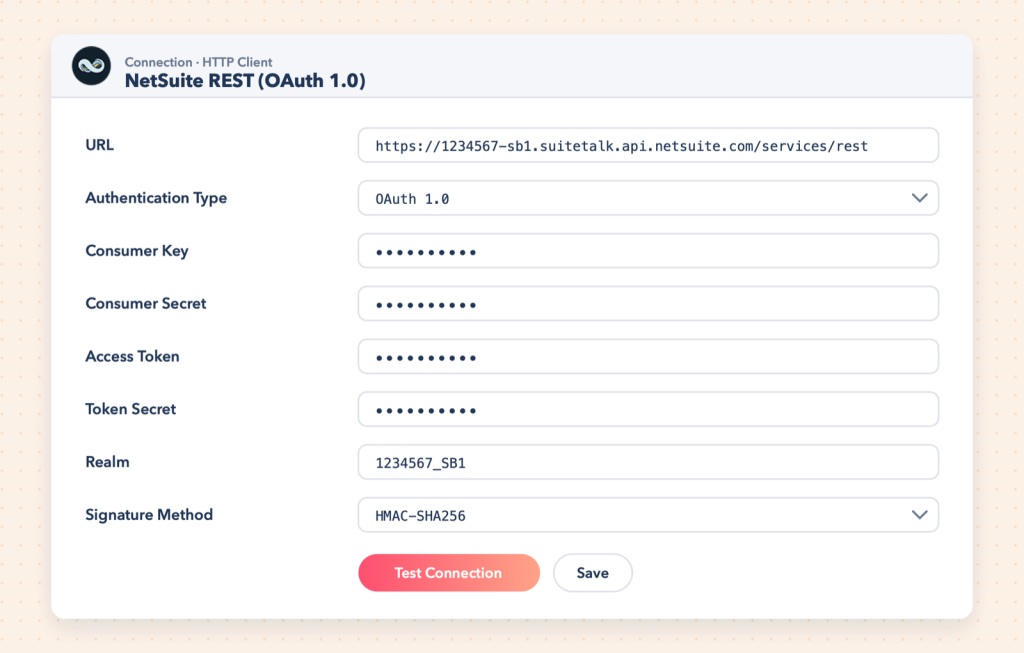
NetSuite no longer accepts HMAC-SHA1 for new integrations, so make sure the signature method is SHA-256. Boomi computes the timestamp, nonce and signature for every request.
Tip: Before configuring Boomi, make one successful call from Postman using its OAuth 1.0 authorisation helper. When Postman works and Boomi does not, compare the realm and the signature method first.
Part 4: operations
| Task | Method | Resource path |
|---|---|---|
| Read a customer | GET | record/v1/customer/42 |
| Create a customer | POST | record/v1/customer |
| Update fields | PATCH | record/v1/customer/42 |
| Delete | DELETE | record/v1/customer/42 |
| Query with SuiteQL | POST | query/v1/suiteql |
Use a replacement variable for the record ID, as described in Make HTTP calls in Boomi.
Creating records
A successful create returns HTTP 204 (no content) with the new record’s URL in the Location header, which ends with the internal ID. Capture it if later steps need the ID.
SuiteQL queries
POST /services/rest/query/v1/suiteql
Prefer: transient
Content-Type: application/json

{"q": "SELECT id, companyname, email FROM customer WHERE lastmodifieddate > TO_DATE('2026-10-01', 'YYYY-MM-DD')"}
The response contains an items array plus paging fields. Request further pages with limit and offset query parameters until there are no more results.
Troubleshooting
- 401 / INVALID_LOGIN: wrong realm format, HMAC-SHA1 instead of SHA-256, or a token for a different role.
- 403: the role lacks REST Web Services or record permissions.
- 400 on create: required fields missing; the response body explains which.
SOAP or REST?
Use REST for JSON-native work, SuiteQL reporting queries and lightweight calls. Use the SOAP-based NetSuite connector when you want Boomi to import NetSuite’s full schema and generate profiles for you, or when you work heavily with saved searches.