
In healthcare and employee benefits, EDI carries some of the most sensitive data any business handles: who is covered, by which plan, from which date, and what was paid for their care. This guide explains how the EDI lifecycle works in the health and HCM benefits sector — the 834 benefit enrollment file that employers and HR systems send to insurance carriers, the 820 premium payment, the 270/271 eligibility check, the 837 claim and the 835 remittance — plus the acknowledgments, compliance rules and integration patterns that hold it all together.
If you have read the EDI document lifecycle explained, you know the retail version: purchase order, ship notice, invoice. Healthcare and benefits follow the same principles — standard X12 documents, envelopes, acknowledgments, trading-partner rules — but the documents, the regulations and the cost of mistakes are different. A wrong ship notice causes a chargeback. A wrong enrollment file can leave someone at a pharmacy counter being told they have no coverage.
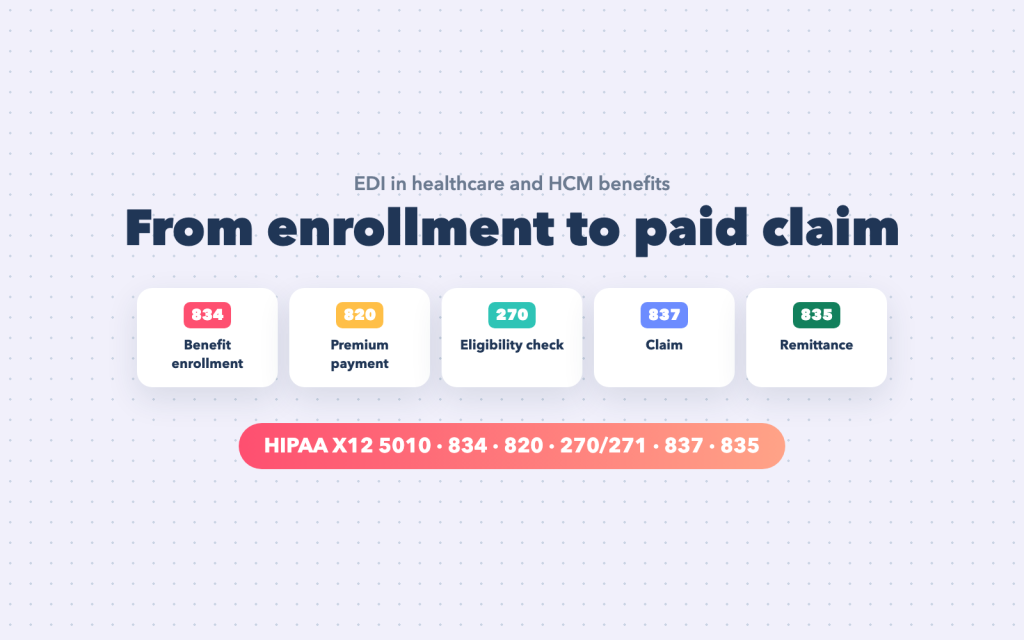
Two lifecycles, one member
It helps to see healthcare EDI as two connected loops:
- The benefits loop (employer ↔ carrier). An employer’s HCM or benefits administration system tells insurance carriers and third-party administrators (TPAs) who is enrolled, in which plans, from when — and pays the premiums. This is where HR, payroll and benefits teams live, and where the 834 and 820 do their work.
- The care loop (provider ↔ payer). When a member receives care, the provider checks their eligibility, submits a claim and receives payment from the health plan. This is the revenue cycle of hospitals and practices, driven by the 270/271, 837, 277 and 835.
The member is the link between the two. If the benefits loop is wrong — an enrollment never sent, a termination sent too early — the care loop fails at the very first step, when the provider’s eligibility check comes back “not covered”.
The transaction sets
In the United States, HIPAA requires health plans, clearinghouses and providers who conduct these transactions electronically to use specific ANSI X12 version 5010 transactions, each defined in detail by an implementation guide (often called a TR3):
| Transaction | Name | Typical sender → receiver |
|---|---|---|
| 834 | Benefit Enrollment and Maintenance | employer / HCM / exchange → carrier or TPA |
| 820 | Payment Order / Remittance Advice (premiums) | employer → carrier |
| 270 / 271 | Eligibility inquiry / response | provider → payer / payer → provider |
| 278 | Health care services review (prior authorization) | provider ↔ payer |
| 837 | Health care claim (P professional, I institutional, D dental) | provider → payer (often via a clearinghouse) |
| 276 / 277 | Claim status inquiry / response | provider ↔ payer |
| 277CA | Claim acknowledgment | payer or clearinghouse → provider |
| 835 | Health care claim payment / remittance advice | payer → provider |
| 999 | Implementation acknowledgment | receiver → sender of any of the above |
| TA1 | Interchange acknowledgment | receiver → sender (envelope level) |
Every one of these has a companion guide from the receiving organization — the carrier’s or payer’s own rules on top of the standard: which optional segments they require, which codes they accept, how often they want files, and how they want them delivered.
The benefits lifecycle (HCM side)
For HR and benefits teams, the lifecycle starts with an employee and ends with a reconciled invoice.
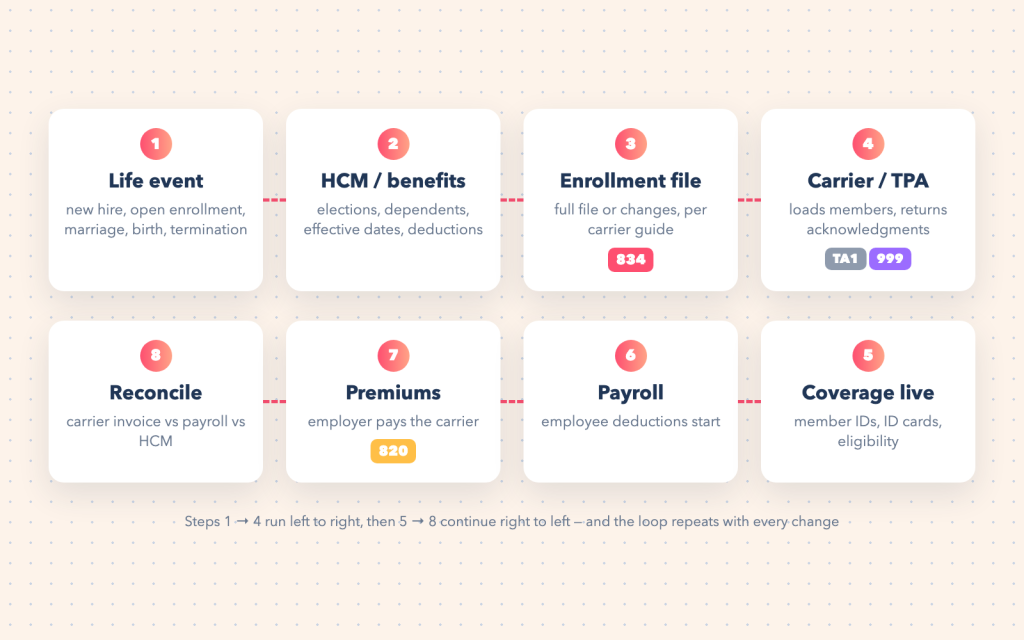
1. A life event happens
Everything in benefits is driven by events: a new hire becomes eligible after a waiting period, open enrollment changes thousands of elections at once, a qualifying life event (marriage, birth, adoption, divorce) allows mid-year changes, and a termination ends coverage — often triggering COBRA continuation. Each event has an effective date, and many are backdated.
2. The HCM records the elections
The HCM or benefits administration system holds the truth: which plans each employee chose, which dependents are covered, the coverage level (employee only, employee plus spouse, family) and the effective dates. It also sets up the payroll deductions for the employee’s share of the cost.
3. The 834 enrollment file is generated
The integration turns that data into an 834 for each carrier — medical, dental, vision, life, disability, each potentially a different company with its own companion guide. The file contains one member loop per person (subscriber and dependents), each with demographics, identifiers and one or more coverage segments.
4. The carrier loads it and acknowledges
The carrier returns a TA1 if there is a problem with the envelope and a 999 saying whether the file met the implementation guide. Then comes the part the 999 doesn’t cover: the carrier’s own processing, where members can still be rejected for business reasons (an unknown plan code, a dependent over the age limit, an effective date outside the allowed window). Carriers usually report those through error reports or portals rather than EDI — and someone has to read them.
5. Coverage goes live
Members get IDs and ID cards, and providers’ eligibility checks (the 270/271 in the care loop) start returning “covered”.
6. Payroll deductions begin
The employee’s contributions flow through payroll from the right pay period — including catch-up deductions for retroactive enrollments.
7. Premiums are paid (820)
The employer pays the carrier, increasingly with an 820 that lists which members and which coverage the payment is for, or against the carrier’s monthly invoice.
8. Everything is reconciled
The carrier’s invoice, the HCM’s enrollment and payroll’s deductions must agree. Differences mean someone is covered and not paying, paying and not covered, or billed twice. Monthly reconciliation is where enrollment problems surface — and the earlier they are found, the cheaper they are to fix.
Anatomy of an 834
An 834 is a standard X12 interchange (ISA/GS/ST envelopes, as in the retail guide), with a header identifying the file, the employer (plan sponsor) and the carrier, followed by one member loop per person.
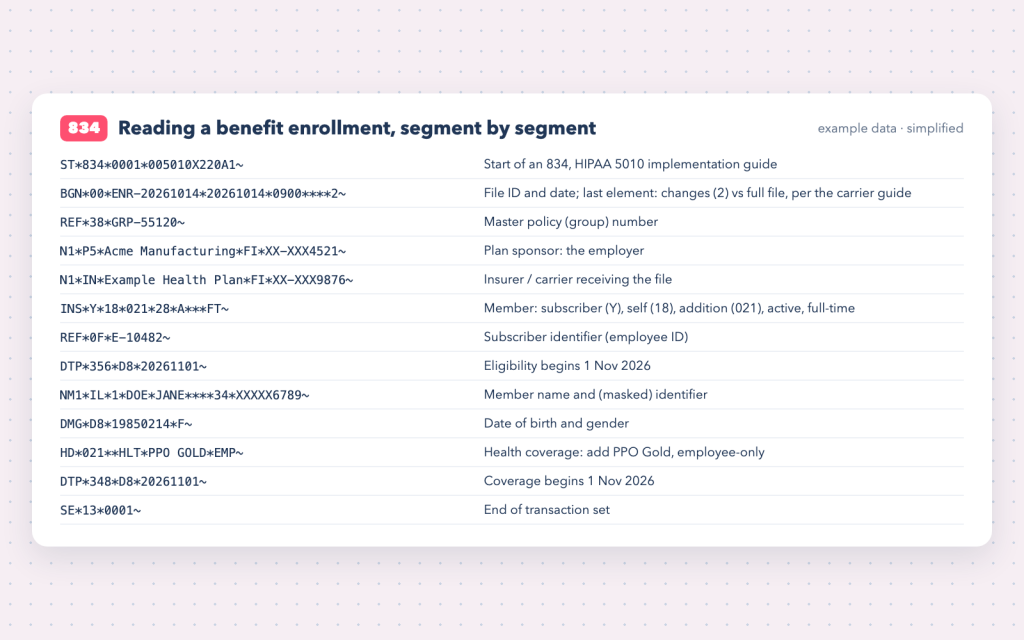
ST*834*0001*005010X220A1~
BGN*00*ENR-20261014*20261014*0900****2~
REF*38*GRP-55120~
N1*P5*Acme Manufacturing*FI*XX-XXX4521~
N1*IN*Example Health Plan*FI*XX-XXX9876~
INS*Y*18*021*28*A***FT~
REF*0F*E-10482~
DTP*356*D8*20261101~
NM1*IL*1*DOE*JANE****34*XXXXX6789~
DMG*D8*19850214*F~
HD*021**HLT*PPO GOLD*EMP~
DTP*348*D8*20261101~
SE*13*0001~
The segments worth knowing:
- BGN — the file’s identity and date; its last element tells the carrier whether this is a set of changes or a full replacement, as the carrier’s guide specifies.
- INS — the start of a member. It says whether the person is the subscriber (
Y) or a dependent (N), their relationship (18= self,01= spouse,19= child), the maintenance type (021addition,001change,024termination,030audit) and their employment status. - REF — identifiers such as the employee ID or the group policy number.
- NM1, N3, N4, DMG — name, address, date of birth and gender.
- HD — a coverage: the line of insurance (
HLThealth,DENdental,VISvision), the plan, and the coverage level (EMP,ESP,ECH,FAM). - DTP — dates, with qualifiers that matter enormously:
356eligibility begin,357eligibility end,348benefit begin,349benefit end.
The example above is simplified, with fictional data — a real file carries more segments (addresses, additional identifiers, header dates) depending on the carrier’s companion guide.
Full files versus change files
One of the first decisions in any 834 project — usually made by the carrier — is how changes are communicated.
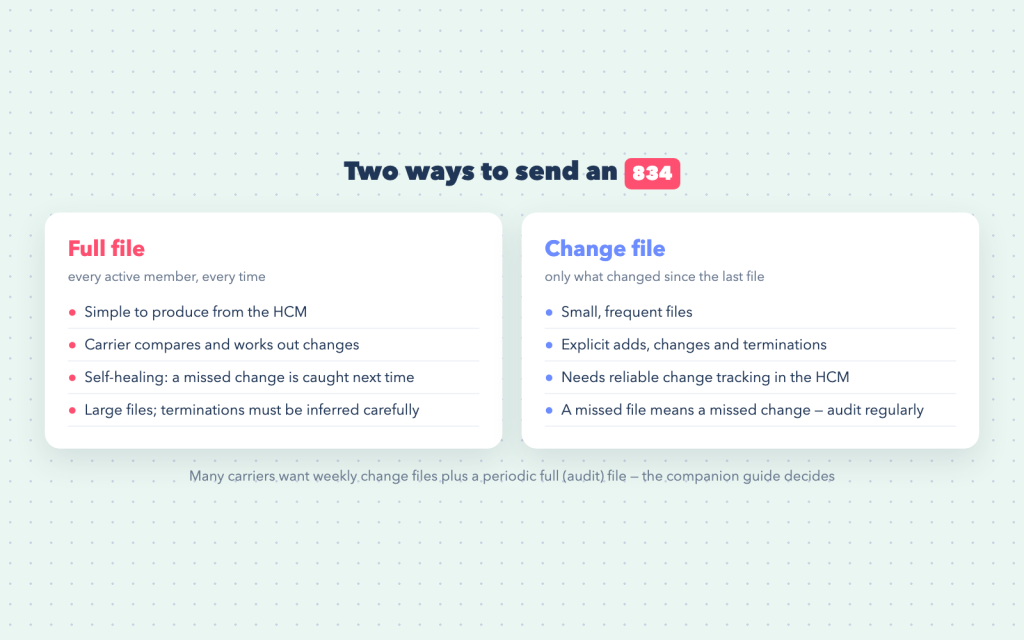
A full file lists every active member every time. It is simple to produce and self-correcting, but large, and terminations have to be inferred from people who are missing — which is risky if a member is missing because of a data error rather than a real termination. A change file sends only adds, changes and terminations. It is small and explicit, but it relies on the HCM tracking every change reliably; a single missed file means a missed change. Many carriers ask for weekly change files plus a periodic full “audit” file to reconcile the two.
The care lifecycle (provider ↔ payer)
On the provider side, EDI drives the revenue cycle — from checking coverage to getting paid.
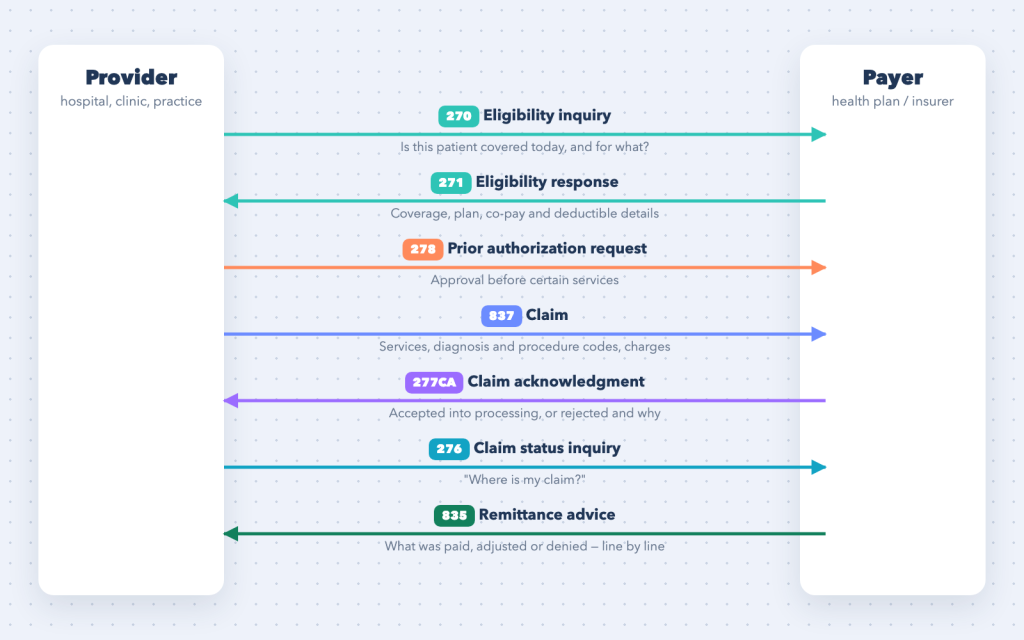
- Eligibility (270 → 271). Before or at the visit, the provider asks the payer whether the patient is covered and what their benefits are — plan, co-pay, deductible remaining. This is the moment the benefits loop is tested: if the 834 hasn’t been processed, the answer is “not found”.
- Prior authorization (278). Some services need approval in advance; the 278 requests and returns it.
- The claim (837). After care is delivered, the provider (often through a clearinghouse) sends an 837 with the patient, the services (procedure codes), the diagnoses and the charges. There are three flavours: 837P professional, 837I institutional and 837D dental.
- Acknowledgments (999 and 277CA). The 999 confirms the file’s structure; the 277CA says whether each claim was accepted into the payer’s processing or rejected at the front door — for example for an invalid member ID.
- Status (276 → 277). Providers can ask where a claim is in processing.
- Payment (835). The payer sends the 835 remittance advice, explaining line by line what was paid, adjusted or denied, using standard adjustment reason codes. Payment itself usually travels separately through the banking system, and providers match the two.
Compliance and security
Benefits and claims files contain protected health information (PHI) and personal data — names, dates of birth, identifiers, coverage and, in claims, diagnoses. That raises the bar for every integration:
- Encrypt in transit and at rest. SFTP with SSH keys (see Connect SFTP with an SSH key), AS2, or HTTPS APIs; many carriers also require PGP encryption of the file itself.
- Minimum necessary. Send only what the companion guide requires; don’t pass extra HR data to carriers “just in case”.
- Business associate agreements. Organizations that handle PHI on behalf of covered entities (integration vendors and TPAs included) typically operate under BAAs.
- Keep PHI out of logs. Integration logs should record file names, counts and member identifiers needed for support — not full member records.
- Access control and retention. Limit who can see files and acknowledgments, and delete processed files on a defined schedule.
Integration patterns that work
Whether the integration is built in Boomi, Celigo, Workato, MuleSoft or code, the same patterns make benefits EDI reliable:
- Effective dating everywhere. Store and send the event’s effective date, not the date the change was keyed. Retroactive changes are normal in benefits — the integration must handle a termination dated last month or an enrollment backdated to the hire date.
- One mapping per carrier, shared logic underneath. Each carrier’s companion guide differs, but member selection, dependent handling and date rules should be shared, so a fix applies everywhere.
- Plan and coverage code tables. Map HCM plan and coverage-level codes to each carrier’s codes in maintained tables, not hard-coded values.
- Reconcile acknowledgments and errors. Track every TA1, 999 and carrier error report against the file sent. An enrollment rejected by the carrier is an employee without coverage until someone acts.
- Test with a carrier’s test environment. Carriers usually require test files and sign-off before production — plan the timeline around it, especially before open enrollment.
- Audit on a schedule. Compare the carrier’s member list (or a full audit file) with the HCM regularly; drift is inevitable and cheap to fix early.
Common pitfalls
- Sending terminations too late — the employer keeps paying premiums for people who have left.
- Sending terminations too early or by accident — active employees lose coverage. Full files that infer terminations from missing members are particularly risky.
- Dependents dropping off because of a missing relationship code or date of birth.
- Open-enrollment files sent before elections are final, followed by a flood of corrections.
- Mismatched coverage levels between HCM, payroll deductions and the carrier — found only at invoice reconciliation.
- Nobody reading the carrier’s error reports.
Frequently asked questions
What is an 834 file?
An 834 is the X12 transaction used to send benefit enrollment and maintenance information — new members, changes and terminations — from an employer, HCM system or exchange to an insurance carrier or TPA.
What is the difference between a 999 and a 997?
Both acknowledge receipt and structural validity of EDI files. The 999 is the implementation acknowledgment used with HIPAA 5010 transactions, reporting errors against the implementation guide; the 997 is the general functional acknowledgment used widely in retail and supply chain EDI.
Do employers have to use the 834?
HIPAA’s transaction standards apply to health plans, clearinghouses and providers. Employers sponsoring plans aren’t generally required to use the 834 themselves, but most carriers and TPAs ask for it because it is the standard for enrollment data.
What is the difference between an 837 and an 835?
The 837 is the claim a provider sends to a payer; the 835 is the payer’s remittance advice explaining what was paid, adjusted or denied for that claim.
How often should 834 files be sent?
It depends on the carrier: weekly change files are common, with a periodic full file for reconciliation, and more frequent files around open enrollment.
Working on benefits or healthcare EDI?
I work on integrations across HCM and workforce systems, ERPs and trading partners, with X12 and EDIFACT documents over SFTP and AS2. If you are connecting an HCM or benefits platform to carriers, or untangling enrollment feeds that keep drifting out of sync, the EDI & B2B file integration service and the integration consulting page explain how I can help. For the retail and supply-chain side of EDI, see the EDI document lifecycle explained. Get in touch.