EDI (Electronic Data Interchange) is how retailers, distributors, manufacturers and logistics providers exchange business documents — purchase orders, ship notices, invoices — computer to computer, in a standard format, without anyone re-typing them. This guide explains the EDI document lifecycle from the first purchase order (850) through the acknowledgment (997), PO acknowledgment (855), advance ship notice (856) and invoice (810), what an X12 file actually looks like, and how a modern EDI platform such as Orderful fits between your trading partners and your ERP.
If you have been told “our biggest customer wants us to be EDI compliant by next quarter”, this is the article I wish I could hand to every team at the start of that project. EDI has a reputation for being arcane — cryptic segments, three-digit document numbers, strict partner rulebooks — but the underlying idea is simple, and once you see the lifecycle as one conversation between two companies, the pieces fall into place.
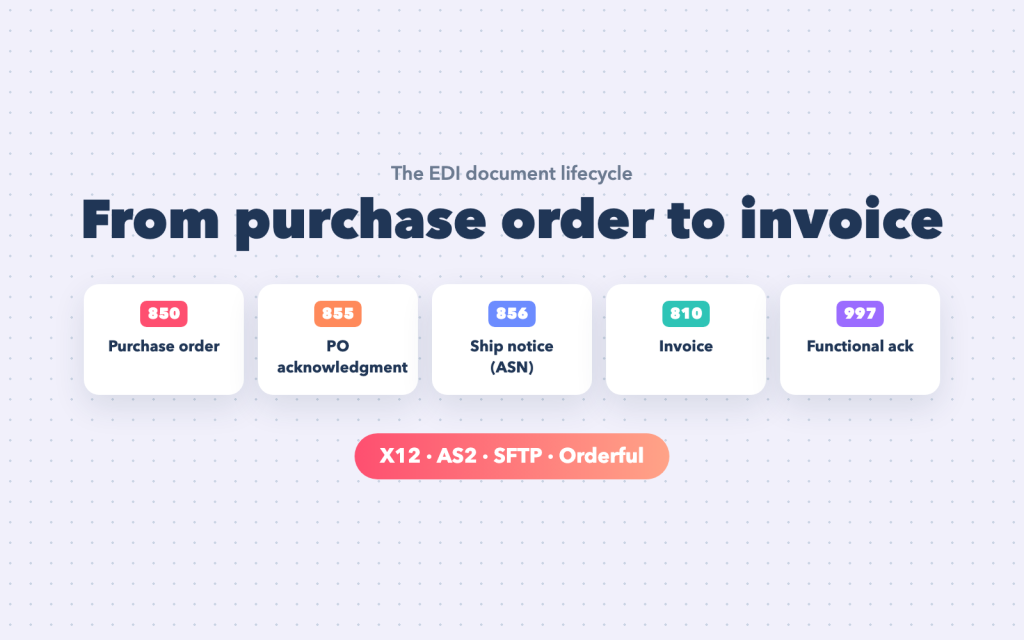
What EDI is — and why it is still everywhere
Before APIs, before JSON, before the cloud, large trading partners needed a way to send each other thousands of orders a day without paper or email. EDI standards gave every common business document a fixed, machine-readable structure. A purchase order looks the same whether it comes from a national retailer or a regional distributor, so a supplier can process it automatically.
Decades later EDI is still the backbone of retail, distribution, manufacturing, logistics and healthcare supply chains. Large retailers typically require suppliers to trade by EDI, publish detailed implementation guides, and charge penalties (chargebacks) when documents are late or wrong. For a growing supplier, EDI is often not a choice but the price of doing business with the biggest customers.
X12 and EDIFACT
There are two major standards. ANSI X12 dominates in North America and identifies documents by number. UN/EDIFACT is common in Europe and much of the rest of the world and uses names. The business meaning is the same:
| Document | X12 | EDIFACT |
|---|---|---|
| Purchase order | 850 | ORDERS |
| Purchase order acknowledgment | 855 | ORDRSP |
| Purchase order change | 860 | ORDCHG |
| Advance ship notice | 856 | DESADV |
| Invoice | 810 | INVOIC |
| Functional acknowledgment | 997 | CONTRL |
| Inventory advice | 846 | INVRPT |
| Remittance advice | 820 | REMADV |
This guide uses X12 numbers, because they are what most teams in the US hear first, but everything applies equally to EDIFACT.
The lifecycle: one conversation between buyer and supplier
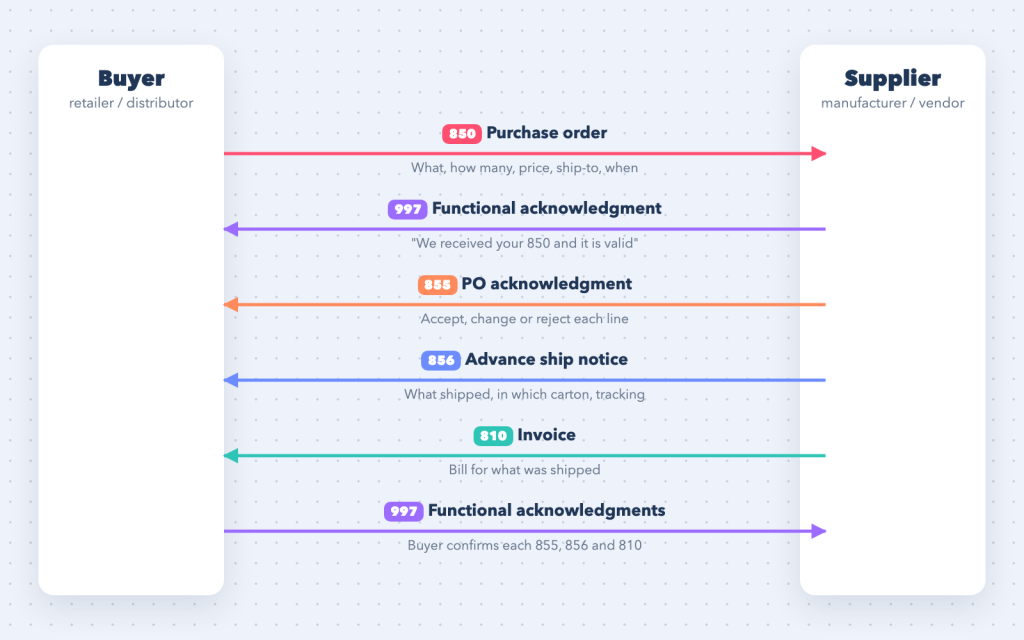
The easiest way to understand EDI is as a conversation. The buyer asks for goods; the supplier confirms, ships and bills; and after every message, the receiver confirms it arrived intact.
1. Purchase order (850)
The buyer sends an 850: who is ordering, which items (by the buyer’s item number, the supplier’s part number, a UPC or GTIN), how many, at what price, where to ship and when. A single 850 can carry many lines and, for retailers, sometimes many store destinations.
For the supplier, the 850 is the start of everything. It has to become a sales order in the ERP or order management system — with the right customer, ship-to, items and prices — usually within hours.
2. Functional acknowledgment (997)
Within a short time of receiving the 850, the supplier’s EDI system sends back a 997. It says one narrow thing: the document was received and it is structurally valid (or it isn’t, and here is why). It does not mean the order is accepted — that’s the 855’s job. Many trading partners require 997s within 24 hours and treat a missing one as a failed delivery.
3. Purchase order acknowledgment (855)
The supplier then confirms the business content with an 855: each line accepted, changed (different quantity, price or date) or rejected. Not every buyer requires 855s, but when they do, they use them to plan — a line that will ship short is far better known today than discovered at the dock.
4. Advance ship notice (856)
When goods leave the warehouse, the supplier sends an 856, the advance ship notice (ASN). It describes exactly what is in the shipment: which orders, which cartons, which items in each carton, carrier and tracking. The buyer’s warehouse uses it to receive the shipment by scanning carton labels instead of opening every box.
The 856 is usually the hardest document to get right, because it has to mirror the physical shipment — more on that below.
5. Invoice (810)
Finally the supplier bills with an 810: what was shipped, at what price, with allowances, charges and terms. Buyers typically match the invoice against the order and the ASN — the classic three-way match — before paying. An invoice that doesn’t match is often held until someone sorts it out.
6. More acknowledgments (997) — and payment
The buyer acknowledges each 855, 856 and 810 with its own 997. Payment usually follows outside EDI or, for some partners, with an 820 remittance advice that tells the supplier which invoices a payment covers.
Documents around the core cycle
Real relationships add a few more: an 860 when the buyer changes a purchase order, an 846 when the supplier reports available inventory, an 812 for credits and debits, and partner-specific documents for returns or warehouse instructions. The core cycle above is where almost every EDI programme starts.
Anatomy of an X12 file
An X12 file looks intimidating until you notice it is just nested envelopes. Data is split into segments (lines ending in a terminator such as ~), each segment into elements separated by a delimiter such as *.
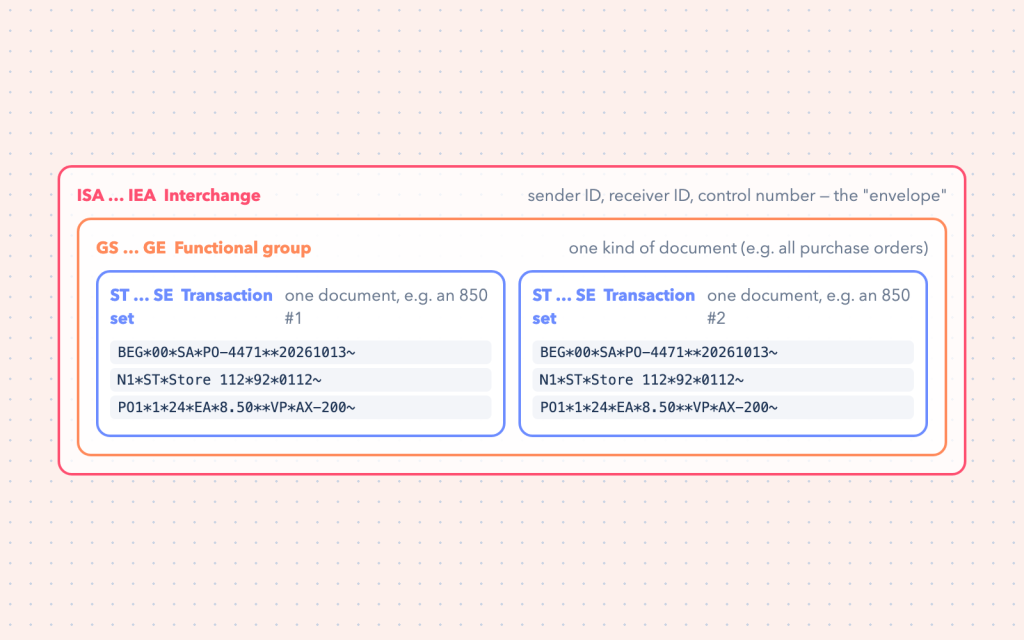
- ISA … IEA — the interchange. The outer envelope: sender ID, receiver ID, date and time, a unique interchange control number, and whether this is test (
T) or production (P) data. - GS … GE — the functional group. Groups documents of one kind (for example all purchase orders) and carries its own control number.
- ST … SE — the transaction set. One business document, such as one 850.
SErecords how many segments the document contains, so the receiver can detect truncation.
Here is a minimal 850, segment by segment:
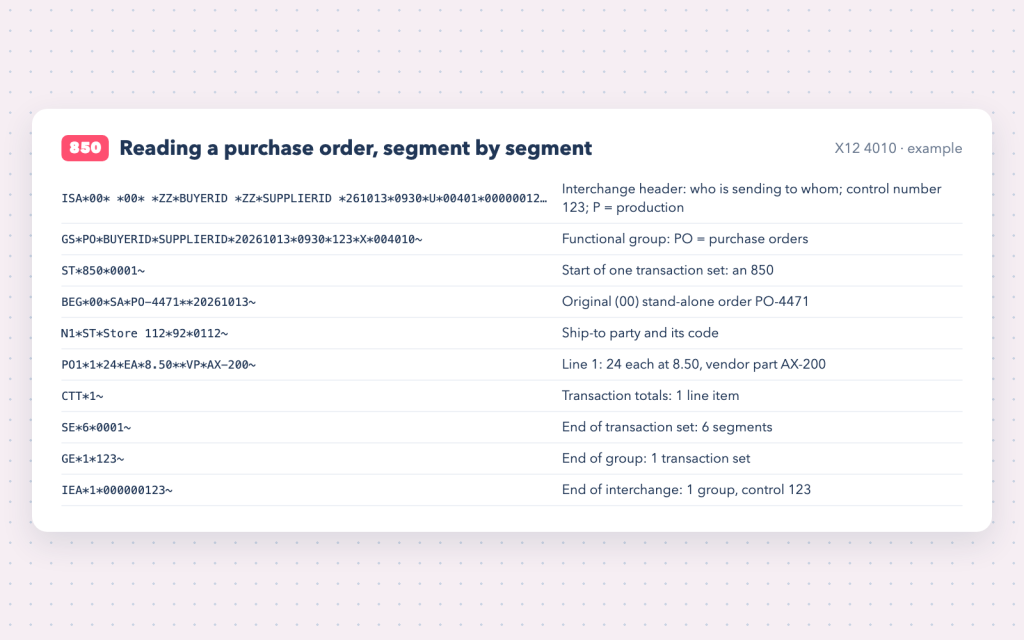
ISA*00*          *00*          *ZZ*BUYERID        *ZZ*SUPPLIERID     *261013*0930*U*00401*000000123*0*P*>~
GS*PO*BUYERID*SUPPLIERID*20261013*0930*123*X*004010~
ST*850*0001~
BEG*00*SA*PO-4471**20261013~
N1*ST*Store 112*92*0112~
PO1*1*24*EA*8.50**VP*AX-200~
CTT*1~
SE*6*0001~
GE*1*123~
IEA*1*000000123~
A few details matter enormously in practice:
- Control numbers must be unique and are checked. Re-sending a file with a reused interchange control number can be rejected as a duplicate.
- Codes carry meaning.
BEG*00*SAmeans original, stand-alone order;VPmeans vendor part number;92inN1means assigned by the buyer. Every partner’s implementation guide lists which codes they use. - Versions differ.
004010and005010are different versions of the standard, with slightly different segments and rules. Your partner tells you which one they use.
How the 997 really works
The 997 deserves its own section, because it is both simple and widely misunderstood. It reports, for each group and each transaction set received, whether it was accepted (A), accepted with errors (E), partially accepted (P) or rejected (R), and for errors, which segment and element was wrong.
Three things to remember:
- A 997 is about structure, not business. An order for an item you don’t stock still gets an accepted 997; the 855 (or a phone call) handles the business rejection.
- Watch the 997s you receive. If a partner rejects your 856, your shipment may be received manually and you may face a compliance penalty. Rejected 997s should alert someone the same day.
- Missing 997s are a signal. If you sent an invoice and never got a 997, the partner may never have received it.
(The related 999 acknowledgment, which reports implementation-level errors, is used mainly in healthcare transactions; the TA1 acknowledges the interchange envelope itself.)
Transport: how documents actually travel
EDI documents need a delivery channel, agreed per trading partner:
| Channel | How it works | Typical use |
|---|---|---|
| AS2 | documents sent over HTTPS, signed and encrypted with certificates; the receiver returns a signed receipt (MDN) | large retailers; direct, secure, provable delivery |
| SFTP | files dropped in and picked up from folders over SSH | very common, simple to set up |
| VAN | a value-added network acts as a mailbox between partners | long-standing EDI relationships |
| API | documents exchanged as JSON or X12 over HTTPS | modern EDI platforms and newer partners |
AS2’s MDN (message disposition notification) proves the file was delivered and decrypted; the 997 then proves it was structurally valid. Two separate receipts, two separate meanings. For SFTP connections, the same key-based security practices apply as in any file integration — see Connect SFTP in Boomi with an SSH key.
The hardest document: the 856 ASN
The advance ship notice describes a physical shipment as a hierarchy, built with HL (hierarchical level) segments. The most common structure is S-O-P-I:
- S — Shipment: carrier, tracking/bill of lading, ship date, ship-from and ship-to.
- O — Order: which purchase order(s) the shipment fulfils.
- P — Pack: each carton or pallet, identified by an SSCC-18 number printed on its GS1-128 label.
- I — Item: the items and quantities inside each pack.
The buyer’s warehouse scans the carton label, looks up the SSCC in your ASN and knows exactly what is inside without opening the box. That only works if the ASN matches reality. A wrong carton count, a missing SSCC or an ASN sent after the truck arrived are classic sources of chargebacks. This is why ASN integrations usually need data from the warehouse or shipping system — cartons and labels — not just from the ERP’s fulfilment record.
Trading partner onboarding
Every new partner relationship follows roughly the same path:
- Get the implementation guide for each document (their rules on top of the X12 standard: which segments are mandatory, which codes they accept, how they expect packs and labels).
- Agree the connection: AS2 certificates and URLs, SFTP accounts, or a network ID — and the sender/receiver IDs used in the ISA envelope.
- Map each document between the partner’s requirements and your ERP fields.
- Test: exchange test documents (ISA usage indicator
T) until the partner certifies each document type. Retailers often run formal certification, especially for ASNs. - Go live, then watch the first real orders, acknowledgments and invoices closely.
The mapping and testing steps are where most of the effort goes — and where a good EDI platform saves the most time.
Where Orderful fits
Traditional EDI meant running translation software on your own servers, maintaining maps per partner in an EDI-specific language, and managing AS2 certificates and VAN mailboxes yourself. Cloud EDI platforms such as Orderful take most of that off your plate.
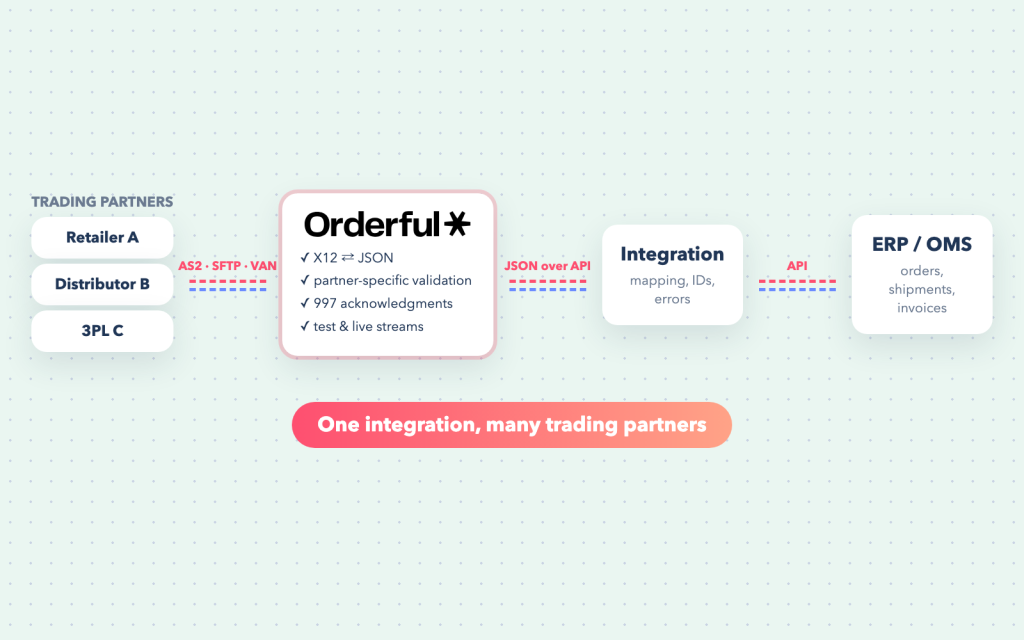
In broad terms, Orderful:
- Manages the trading partner connections — AS2, SFTP or network — so each partner connects to the platform rather than to your servers.
- Translates between X12 and JSON, so your integration works with structured JSON over an API instead of parsing segments.
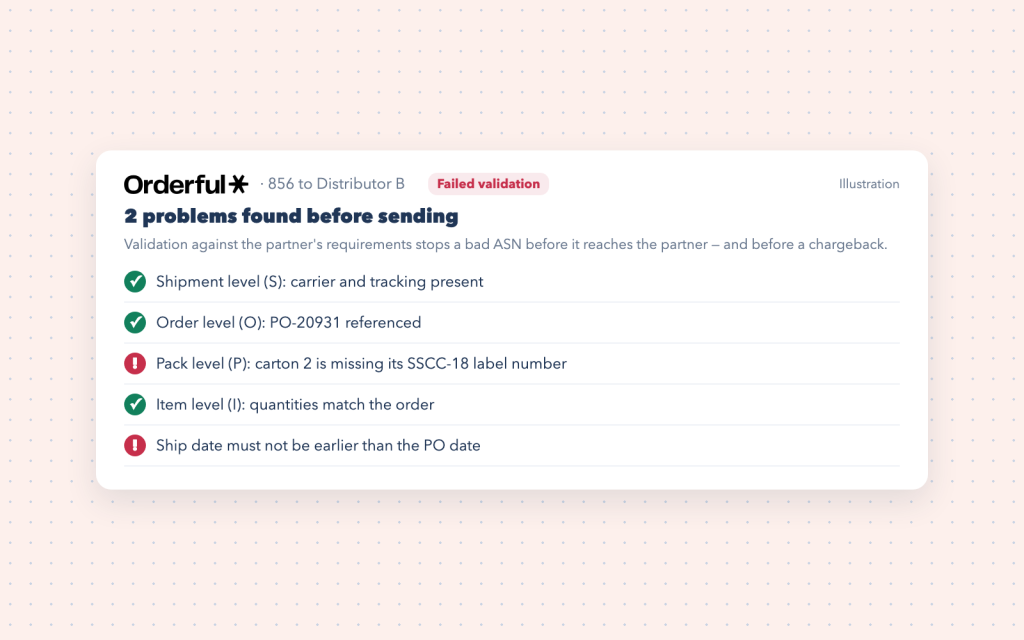
- Validates documents against each partner’s requirements before they are sent, catching the errors that would otherwise come back as rejected 997s or chargebacks.
- Handles acknowledgments and keeps a record of every transaction for tracking and troubleshooting.
- Separates test and live traffic, which makes partner testing and certification much less painful.
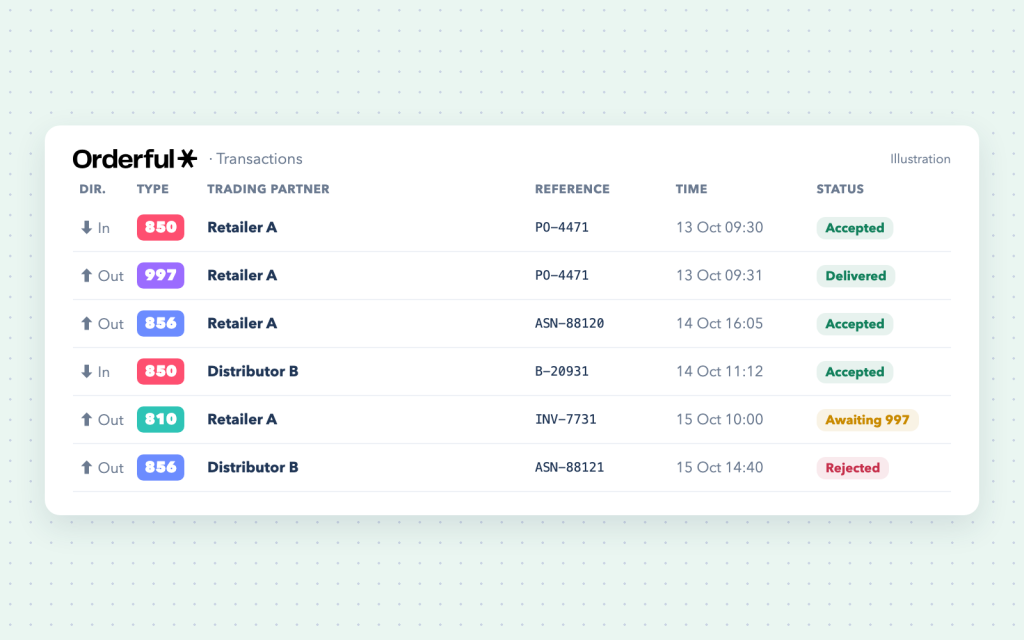
The biggest practical change is that your integration never has to read raw segments. The partner sends X12; your integration receives the same purchase order as structured JSON, and the reverse happens for outbound documents:
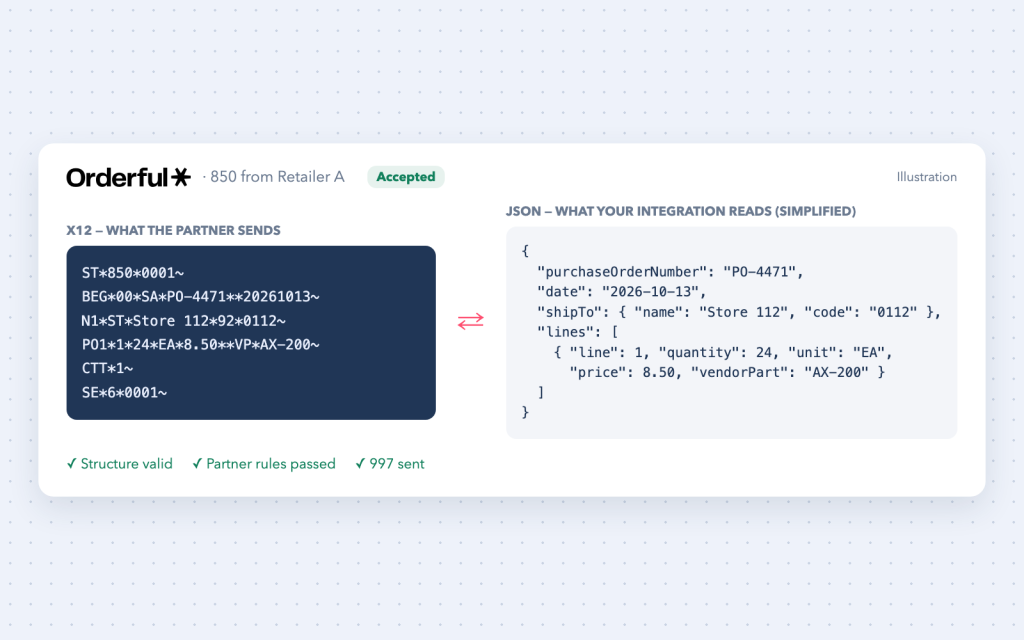
Validation is the other big win. Checking each outbound document against the partner’s rules before it is sent turns a chargeback into a to-do item:
Your integration — built in Celigo, Boomi, Workato, MuleSoft or code — then does the part only you can do: turning an incoming purchase order into a correct sales order in your ERP, and building outgoing ASNs and invoices from your shipments and billing.
The integration’s job
In one project of mine, for example, Celigo flows connect Orderful to NetSuite: 850s become NetSuite sales orders, and item fulfilments and invoices go back as 856s and 810s (case study). On the ERP side, the work looks like any other well-designed integration, with a few EDI-specific twists:
- Inbound 850 → sales order. Map the buyer’s identifiers to your customer and ship-to locations, and their item numbers (or UPCs) to your items. Keep the PO number and line numbers on the sales order — every later document must quote them.
- Idempotency. The same purchase order may be delivered twice. Use the buyer’s PO number as an external key so a duplicate never creates a second sales order — the same principle as create-or-update in Boomi.
- Outbound 856 from shipments. Pull fulfilments, cartons and tracking from the ERP or warehouse system, build the S-O-P-I hierarchy and send promptly — ideally as the truck leaves.
- Outbound 810 from invoices. Quote the original PO and line numbers, use the partner’s units of measure, and include the allowances and charges they expect.
- Error handling. Validation failures and rejected acknowledgments go to a queue that a person reviews the same day, with the PO number and the reason. A rejected ASN found a week later is a chargeback; found the same morning, it’s a resend.
A practical checklist for an EDI programme
- Collect every partner’s implementation guides before estimating.
- Decide which system is the source for each outbound document (ERP, warehouse, shipping software).
- Store partner IDs, PO numbers and line numbers on your ERP records.
- Make inbound processing idempotent.
- Alert on rejected or missing 997s, not just on integration errors.
- Send ASNs before the shipment arrives — many partners have strict timing rules.
- Keep test and production completely separate, down to the ISA usage indicator.
- Track chargebacks: they are the best feedback on where the process is weak.
EDI beyond retail
The same ideas — standard documents, envelopes, acknowledgments and partner-specific rules — run healthcare and employee benefits too, with different documents: the 834 enrollment file from HCM systems to insurance carriers, 820 premium payments, and the 270/271, 837 and 835 transactions between providers and payers. See how the EDI lifecycle works in healthcare and HCM benefits.
Frequently asked questions
What is the difference between a 997 and an 855?
A 997 confirms the document was received and is technically valid. An 855 confirms the business response to a purchase order — which lines are accepted, changed or rejected.
What does an 856 ASN contain?
The shipment details (carrier, tracking, dates), the orders it fulfils, every carton or pallet with its SSCC-18 label number, and the items and quantities in each — usually arranged in a Shipment → Order → Pack → Item hierarchy.
Do I need AS2 for EDI?
Only if your trading partner requires it. Many accept SFTP or a VAN, and EDI platforms such as Orderful can manage AS2 connections for you.
Can EDI be integrated with NetSuite, Salesforce or another ERP?
Yes. An EDI platform handles the partner side, and an integration (Boomi, Celigo, Workato, MuleSoft or custom code) creates sales orders from 850s and builds 856s and 810s from shipments and invoices in your ERP.
What happens if an EDI document is wrong?
The partner’s system may reject it with a 997, or accept it and flag a compliance issue later. Retailers commonly apply chargebacks for late or inaccurate ASNs and invoices, which is why validation before sending matters so much.
Working on EDI?
I have worked with X12 and EDIFACT documents — 850, 810, 856 and 997 — over AS2, SFTP and FTP/S, including an Orderful-to-NetSuite EDI integration built with Celigo. If you are onboarding a new retail partner, moving off a legacy EDI setup, or connecting EDI to NetSuite or another ERP, the EDI & B2B file integration service and the integration consulting page explain how I can help. Get in touch.